Offline PWA for Kanboard

Your Kanboard finally leaves the house.

Kanteen turns the Kanboard on your Pi or NAS into an installable app that actually feels good on a phone. Boards live on your device — drag, edit, comment with no connection at all — and every change queues up and replays the moment you're back on your LAN. No cloud, no tunnel, no port forwarding.

Self-hosted LAN-only sync MIT licensed Kanboard 1.2+
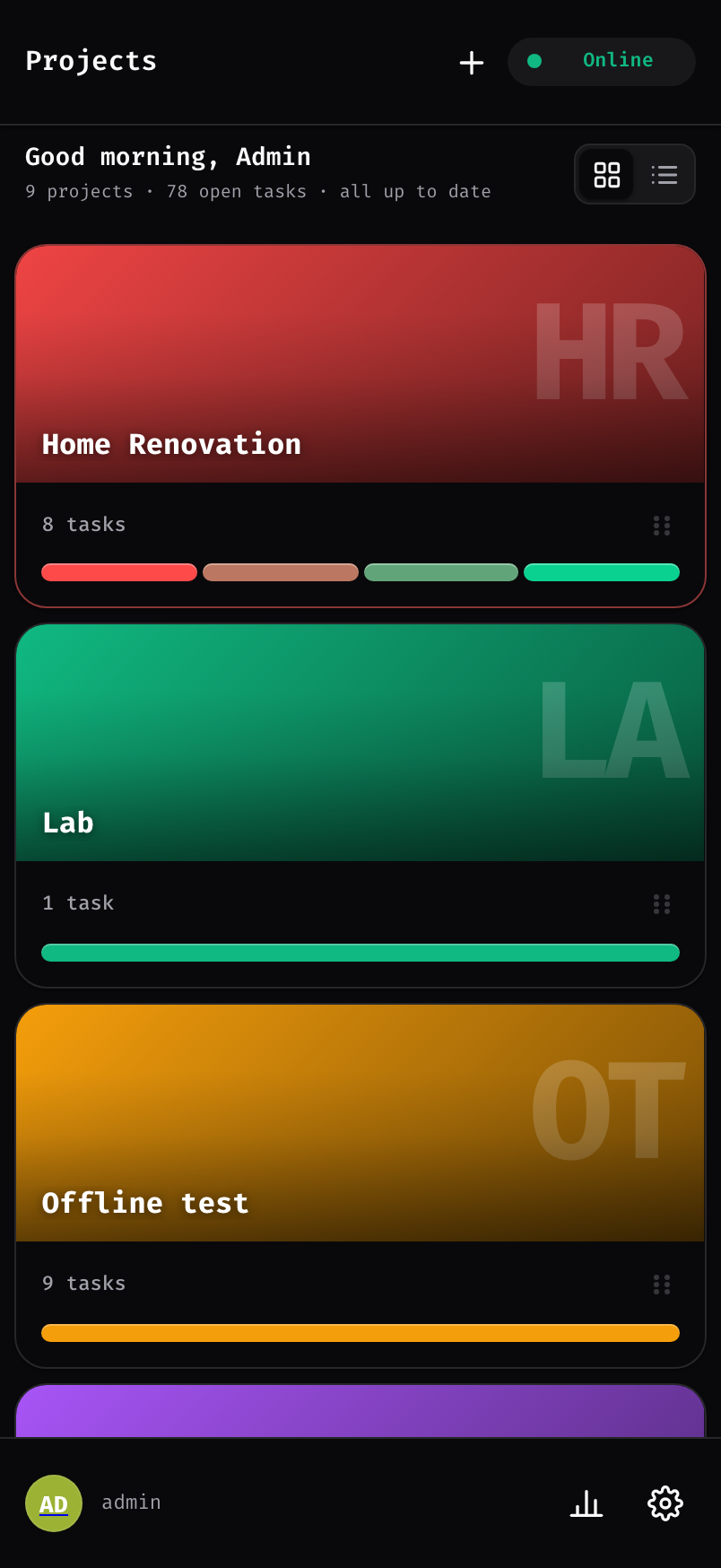
The Kanteen projects screen on a phone, showing project covers
All changes synced
01 / Why it exists

Kanboard is great — until you pick up your phone

Self-hosting keeps your data on your own hardware. The trade-off is a desktop-first UI that vanishes the moment you leave the network. Kanteen closes both gaps.

The mobile problem

The stock UI was never built for touch

On a phone, Kanboard means tiny tap targets, dense tables, and pinch-to-zoom for every card. It works, but it fights you the whole way — and there's nothing to install.

Kanteen: a touch-first interface with big targets, drag-friendly boards, and a home-screen install that launches full screen like a native app.
The offline problem

Step off the LAN and the board is gone

No cloud means no board on the commute, at the café, or in the basement. The usual fix — a reverse proxy or tunnel — puts your private server on the public internet, which defeats the point of self-hosting.

Kanteen: your boards are cached on-device and fully editable offline, then sync back over your LAN when you return. Your server never touches the internet.
02 / What you get

The full Kanboard workflow, minus the connection

Every read and write hits a local database in your browser first. The server is only contacted when it's actually reachable — and only over your LAN.

True offline editing

Create, move, comment, and complete tasks with zero connectivity. Nothing in the UI ever blocks on a network request.

Sync on reconnect

Every offline edit joins a queue and replays in order the moment your LAN is reachable again — no manual export, no lost work.

Field-level conflict resolution

Changed the same task in two places? You decide, per field: keep yours, take the server's, or merge the two.

Installable PWA

Install it from your phone's home screen — or straight from Chrome on desktop — and it runs in its own window, loads instantly, and keeps working with airplane mode on.

Your data stays put

Boards live in IndexedDB on your device and sync only to your own server. No proxy, no tunnel, no cloud middleman — by design, not by toggle.

Boards and analytics

Covers, filters, categories, subtasks, comments, attachments — plus completion, distribution, and velocity charts, computed on-device.
See the full feature rundown

Offline-first

  • Full board cached in IndexedDB after first sync
  • Every read and write works with no network
  • Edits queue on-device and replay in order
  • Real LAN reachability probing, not just navigator.onLine

Installable PWA

  • Install on Android and iOS home screens, or on desktop from Chrome or Edge
  • Runs standalone in its own window — no tabs, no browser chrome
  • One responsive layout, from phone to tablet to a big wall display
  • App shell precached by a service worker
  • Custom app icon — upload your own in Kanboard settings
  • Served over trusted HTTPS — the service worker needs a secure origin
  • Data never leaves IndexedDB except to sync

Board and tasks

  • Drag and drop cards across columns and swimlanes
  • Auto-scroll while dragging near edges
  • Inline quick-add task per column
  • Live board filters — text search, assignee, category
  • Auto-close tasks dropped in a done column, with an undo toast
  • Title, description, color, priority, category, assignee, due date
  • Quick-add a new category, color and all, right from the task form
  • Markdown descriptions with automatic RTL and LTR direction
  • Move tasks between projects, columns, and swimlanes
  • Create and delete tasks, with subtasks and files

Comments and subtasks

  • Add, edit, and delete comments — URLs auto-link
  • Add, edit, delete, and drag-to-reorder subtasks (order stays on this device)
  • Everything queues offline and syncs on reconnect

File attachments

  • Attach files or photos, with camera capture on mobile
  • Inline image lightbox
  • Pending uploads queue offline and push on reconnect
  • Delete attachments with confirmation

Projects

  • Grid and list views
  • Covers: solid color, tint, or your own photo — synced to the server
  • Per-project task distribution at a glance
  • Drag to reorder projects
  • Full project editor — rename, columns with WIP limits, swimlanes, categories
  • Create and delete projects

Sync engine

  • Push then pull: your queued edits replay first
  • Field-level conflict detection
  • Resolve conflicts: keep mine, take server, or merge per field
  • Tasks created offline get real IDs remapped on first sync
  • Items deleted on the server are cleaned up locally
  • Last-synced status and a manual sync button in settings

Modern UI

  • Mobile-first layout with touch-sized targets
  • Responsive across phone, tablet, and desktop
  • Toasts for sync status and errors
  • Privacy mask for shared screens — three strengths, remembered per board

Themes and fonts

  • Picks light or dark from your OS on first launch
  • Built-in presets plus fully custom themes
  • Font picker — Google fonts cached for offline use after you pick one
  • Adjustable text size — default, large, or extra large
  • Custom themes stay on the device that made them

Analytics

  • Completion and column-distribution dashboard
  • Velocity chart
  • Per-project info and stats sheet
  • Computed on-device, so it works offline

Backup and export

  • Export all offline data to a portable .kbsync file
  • Import restores your queued edits, ready to replay
  • Auto-backup to disk on Chromium — set the interval and how many to keep
  • A proactive banner warns when unsynced edits go unbacked too long
  • Requests persistent storage so the browser won't evict your data
03 / A look inside

Fast, focused, and at home in the dark

Monospace type, a restrained zinc palette, and a layout that earns its spot on your home screen.

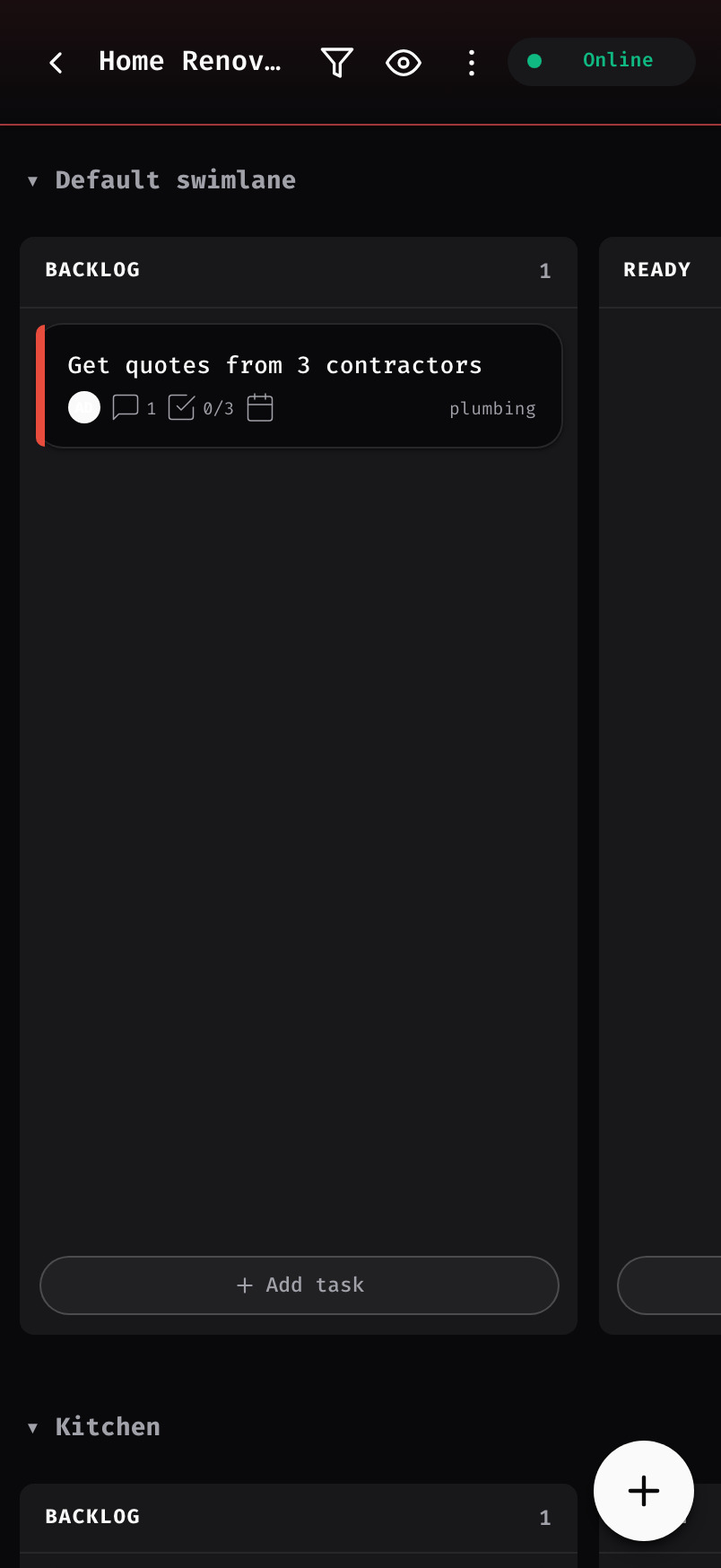
Kanban board with columns and a task card
The boardDrag cards across columns and swimlanes
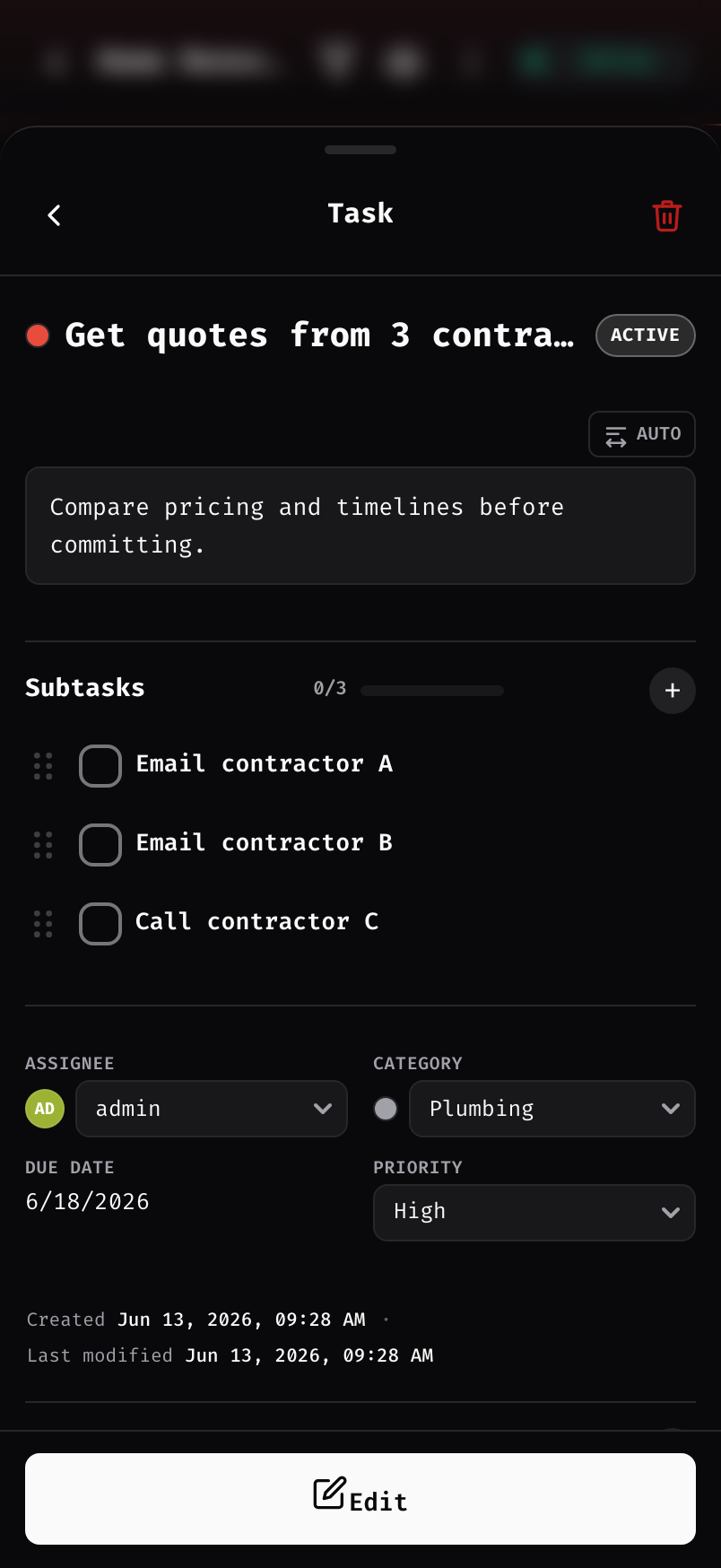
Task detail with subtasks, assignee, category, and priority
Task detailSubtasks, attachments, markdown, priority
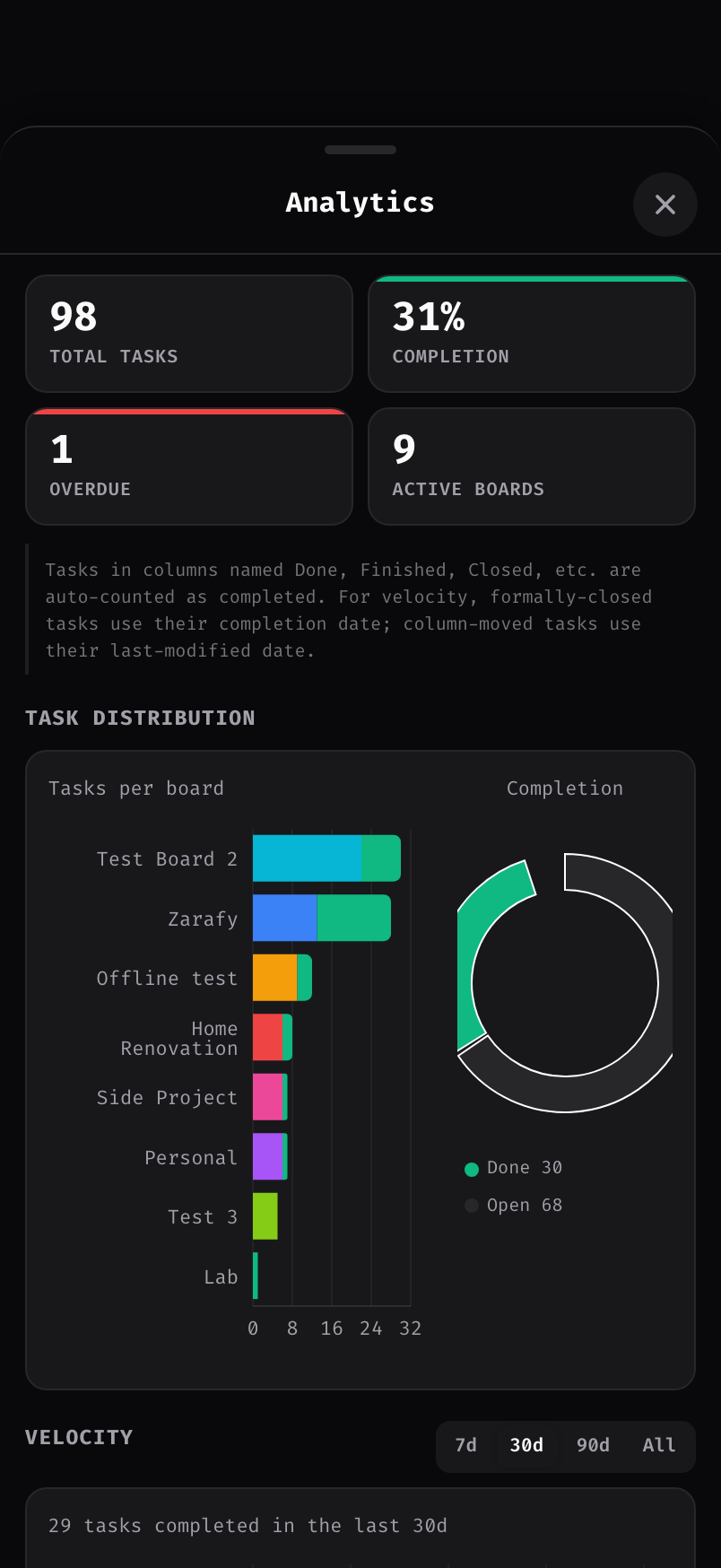
Analytics dashboard with completion, distribution, and velocity
AnalyticsCompletion, distribution, velocity — offline too
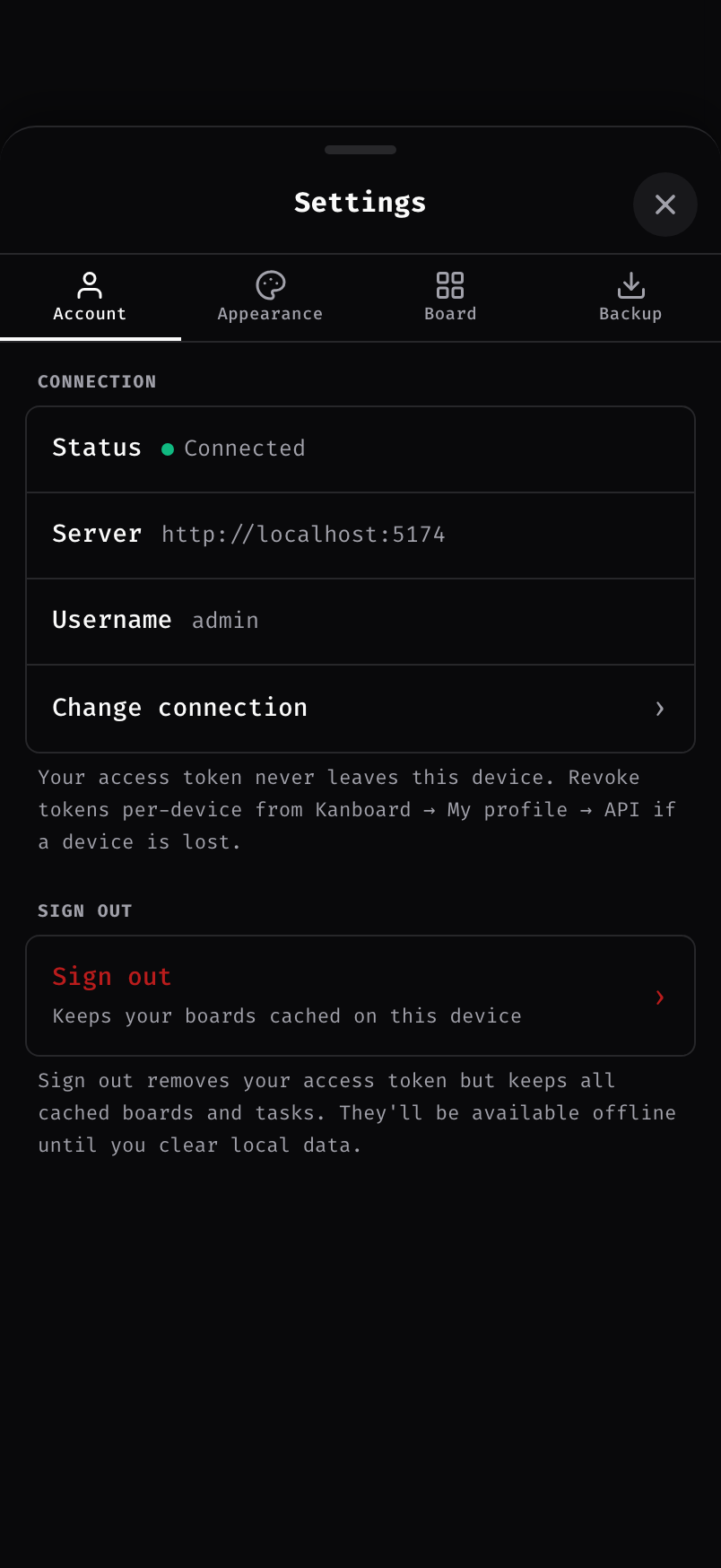
Settings screen with theme presets, custom themes, and a font picker
Make it yoursTheme presets, custom themes, a font picker
04 / Three steps

Connect once, then work anywhere

Connect on your LAN

Serve Kanboard over a trusted HTTPS origin (a mkcert LAN cert does it), then sign in once with your server address and your Kanboard password or a personal access token. Your boards download straight to the device.

Edit offline

Lose Wi-Fi, hit a dead zone, go to the basement — keep working. Every change lands in a queue on your device, in order.

Sync on reconnect

Back on your network, the queue replays automatically. If a field changed in both places, you pick the winner — yours, the server's, or a merge.

05 / The backend

It runs on the Kanboard you already self-host

Kanteen isn't a fork or a replacement — it's a thin plugin plus a PWA client on top of your own Kanboard. It talks to Kanboard's JSON-RPC API and reads and writes the exact same data as your web UI.

  • Your data stays in Kanboard. Projects, tasks, users, and permissions live in your existing Kanboard database, wherever it already is.
  • Nothing to migrate. Drop the plugin in and your current boards show up. Keep using the standard web UI side by side.
  • Uses your own auth. Sign in with your Kanboard username and password, or a personal access token. No new accounts, no third-party service.
  • No Node on the server. The plugin ships pre-built. If your Pi or NAS runs Kanboard today, it runs Kanteen today.
06 / Get Kanteen

Free forever. Pay what feels right.

The whole plugin is open source under the MIT license — free to download, run, fork, and modify. If it earns a spot on your home screen, chip in whatever it's worth to you.

Open source
$0 / forever
  • The full plugin — every feature
  • MIT licensed — fork and modify freely
  • Pre-built — no Node on your server
  • Community issues and pull requests
Download from GitHub
install
# Drop the plugin into your Kanboard install
cd /var/www/app/plugins
curl -LO https://github.com/Zarafy-labs/kanteen-offline-Kanboard/releases/latest/download/kanteen.zip
unzip kanteen.zip && rm kanteen.zip
# Reload Kanboard, then launch "Open Kanteen" from the header menu.

Requires Kanboard 1.2.0 or newer, served over a trusted HTTPS origin — the offline service worker only runs in a secure context, and a self-signed cert is treated as insecure. Issue a LAN cert with mkcert and trust its root CA on each device (see INSTALL.md). Install the PWA from one fixed address and always launch from the app icon — offline storage is tied to that exact origin.